
I broke my right foot three years ago, and have never regained the strength I once had. In my old van, my foot would get tired and sore during long highway drives from constantly pressing on the gas pedal. I swore that the next van I got would have cruise control to avoid this. Smokey II not having it was the only thing wrong with it. My research before buying it revealed multiple ways I could add it, one of which was to enable the functionality already built into my van’s computer. It turns out ALL Transits have cruise control built-in, whether it’s enabled or not! It’s not surprising, since companies that buy or lease cargo vans want them as cheap as possible, so they leave out options like cruise or a nice stereo. I found this post on the Ford Transit USA Forum that explained how to unlock this hidden capability. I’ll summarize the process here to save you the trouble of reading the entire thread yourself, but full credit for discovering this process goes to the people on the forum, not to me.
Another popular option is the Rostra add-on cruise control system. This is an aftermarket system that ties into the van’s wiring to assume throttle control when activated. I didn’t care for the idea of altering the original wiring, particularly under warranty. It’s also not cheap, selling for $314.95. The last straw was the warning not to use the Rostra system in conjunction with VHF/UHF two-way radios. Between my amateur, GMRS, and FRS radios, that simply wasn’t going to happen!
Basically, you need three things to enable cruise control on an unequipped Transit:
- A steering wheel with cruise control buttons
- The FORScan application for Windows
- A compatible OBD2 scanner
The hardest part will be to find the right steering wheel. There was precisely one on car-part.com that said it had cruise functions, but the photos showed it did not. I found one on eBay for $125 that was in excellent condition. I would’ve preferred a fancy leather-wrapped steering wheel, but beggars can’t be choosers.
The physical replacement was the easiest of any steering wheel I’ve ever done. This video is from an older Transit with a different wheel, but the procedure is identical. First, I disconnected the negative battery terminal. After removing the trim piece above the steering column, I was able to unclip the airbag from the hooks that hold it in, then unplug and remove it from the van. (This is why I disconnected the battery.) The wheel itself is held in with a single bolt. Back in the day, you needed a special tool to pull off a steering wheel, but this one came right off as soon as the bolt was out. Unplug the wiring harness, and set the original steering wheel aside. Installation of the new steering wheel is the opposite of removal, except easier because everything clips together quickly and easily.

I’ve been playing around with FORScan, a powerful program that provides access to all of the diagnostics, tests, and configurations the dealer has, and that traditional scan tools do not. I picked up an OBDLink EX OBD2 adapter, which is what they recommend as the best interface with a Windows computer. (I had to literally dust off my old Windows laptop I haven’t used in two years since being assimilated into the Apple collective. Resistance is futile.) I’ve been doing a lot more with it than enabling cruise control, but that’s a topic for another post.
Following the instructions in the forum post, I opened up the BCM (Body Control Module) menu, found the cruise control options, and enabled regular cruise control. I did not enable any of the adaptive cruise options. I’ve used adaptive cruise in a Ford Mustang and a Lincoln MKS. It works great and even detects slow-moving motorcycles and matches their speed. But my van has none of the extra hardware required for it. No extra hardware, besides the steering wheel with the controls, is required for regular cruise control, so that’s what I enabled, then saved the settings.
You’re not done yet. Cruise is enabled, but the Steering Control Computer Module (SCCM) doesn’t know you have a different steering wheel yet. At this point, none of the buttons will work, even the ones you had on your original wheel. This part gets a bit tricky.
You need to go into the SCCM settings and alter the code inside. The SCCM, along with most other modules, were not available to me in FORScan v2.3.52, which was the latest at the time I did this. However, on the forum post, someone reported success doing this on a 2021 Transit using v2.3.50. I downgraded to the older version, tried again, and all of the modules appeared on the list, including the SCCM. I’ll look around the other modules another time, but right now I was only interested in enabling cruise.
Instead of a simple menu like the BCM provides, the SCCM screen contains addresses, and you have to change the codes within them. It’s scary, but I followed these specific instructions, and it worked perfectly. On the SCCM screen, find address 724-02-01. The code should read B028 B000 00B6. VERY CAREFULLY change this to B008 7000 0056. Save this change, then turn the ignition off and back on again, as instructed.
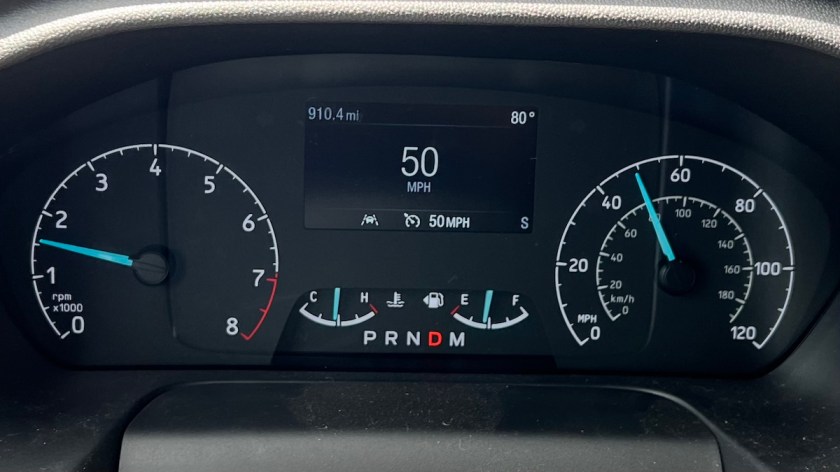
At this point, you should have all steering wheel button functionality, including the cruise control buttons. You can test this by pressing the button that looks like a clock. You should get a “SET” prompt on the small screen on your dashboard. This means that cruise is turned on and waiting for you to set your speed. If you’ve gotten this far, it worked! I took a quick drive at this point just to make sure, and was able to set and adjust my speed with no problem at all. It worked exactly the same as if Ford had built my van this way.
The best part is the price. While the Rostra aftermarket system costs $315, I spent $125 on the steering wheel, $60 for the OBDLink EX interface, and nothing on a two-month free trial of FORScan. (A one-year license costs $12, which I’ll buy when the time comes because I like to tinker, but if all you’re interested in is enabling cruise control, you can use the free trial to do it, then never use it again.) So for a total of $185, a bit more than half the Rostra’s price, I’ve enabled the functions already built into the Transit. That’s a pretty good deal, especially considering that Ford probably charges more than that to “add” cruise control to the van when they build it.
 Smokey Da Van
I just re-wrote the code on my van to have cruise control and I am so freaking stoked! Thanks for the easy step by step directions!
LikeLiked by 1 person
I’m glad that was useful for you! I found the info all over the post on the Ford Transit forums, so I just compiled it in one place. It makes such a huge difference. I find I’m using cruise on any open road without traffic.
LikeLike
Would love to hear how else you’re utilizing the FORscan app for your transit. Seems like I’ve stepped into a whole new world of customization possibilities.
LikeLiked by 1 person
I haven’t gotten too deep into it. While building the interior I disabled the key fob panic button because it kept getting pressed in my pocket while I was crawling around on the floor. I’ve since enabled it again in case something goes bump in the night outside. I’ve also turned off my daytime running lights so that I can pull into a group camp after dark without blinding my friends. I know when to turn my own lights on and off. 🙂 I’ve played with a few other things but haven’t left any changes permanent. Though I still wouldn’t mind figuring out how to change my head unit’s startup/shutdown image from the basic Ford one to the Raptor or GT, just for fun. Imagine a Transit Raptor? Or Transit GT? That would be funny.
LikeLike
I’m digging around to find the same instructions but for a 2016 transit and it’s proving to be difficult to find. I know it’s a slightly different process but doesn’t seem to be well summarized anywhere. Do you recall seeing anything concise for an earlier transit? Seems I need steering angle sensor (clock ring?) as well. Thanks!
LikeLike
Sorry, I don’t recall seeing a similar step-by-step procedure for the earlier Transit. Of course, I wasn’t looking that hard for one, since I was only interested in finding it for my 2021. I’d search the Ford Transit USA forum (https://www.fordtransitusaforum.com/) and see what I could find. Even the procedure for my van wasn’t clearly spelled out like this until I wrote it. The info was all in the same thread, but I pieced it together from the original post and details in the comments that followed.
LikeLike
What year is your Transit?
Great write-up! This inspired me to add factory cruise to my 2017 Transit 350 148 WB Medium Roof. I was able to pick up a steering wheel off eBay for $115. The OBDLink Ex from Amazon for $50, then I got FORScan installed on my windows laptop with the 2 month extended free license. Apparently the process is a bit more involved for transits older than 2020 as you have to get a clock spring with compatible wiring. I’ve got one from eBay on the way but just wanted to point that tidbit out to anyone else who may be looking to add factory cruise!
LikeLike
Thanks for the addition! It’s funny you mention that, because I am now camping with not one, but two earlier Transits that are not equipped with factory cruise control, and may be interested in having me add it. I’m pretty sure the instructions for earlier vans are included in that long thread on the Ford Transit USA forum, but I skipped over them because they didn’t apply to me. I should probably add these to the post. Thank again!
LikeLike
can you please send me instructions on 17 transit please
LikeLike
I need to look into how to do it on earlier Transits. I think you also need to replace the clockspring, but I’m not sure. Check out the forum thread I posted – I think it also has info for earlier vans, but I only paid attention to mine. https://www.fordtransitusaforum.com/threads/2020-transit-adding-cruise-control-using-a-factory-wheel-with-cruise-control.85780/
LikeLike
I just bought 2023 ford transit 250 high top, no cruise control . I’m from Levittown pa , anyone out there who maybe interested in helping me to do my truck??? I’m a plumber, I have a little knowledge, but I don’t trust me to do it myself
LikeLike
Have you been able to make this change?
LikeLike
I have a challenge on a 2018 Transit 250 did the first step and turned on cruise control but I cannot find SCCM using to latest version cannot download the older version. Can anyone give suggestions?
LikeLike
Hi. Help. Has anyone figured out if it’s possible to do this on a 2016 Ford Transit. I just bought a lovely used vehicle and didn’t realize there was no cruise control until I was later cruising down the road. My right leg will not survive our future plans together. Must, must have. Do I suck it up and use Rostra and does it work w my particular model year?
Thx.
LikeLike
I don’t know for sure (one day I should research and update this post), but I think on earlier Transits like yours the clockspring behind the steering wheel needs to be replaced as well. The forum thread I linked should have all the info for earlier models, too.
LikeLike
Thank you so much for this info and also for what seems an open attitude about helping the rest of us walking this path. Like so many others I was shocked that my Transit didn’t have CC. The used steering wheels with CC have become pretty hard t find as lots of people are doing this. Tons of their discards on Ebay. That being said the switches do seem easy to get new and install. They are intended to replace broken ones that are the same, not retrofit CC when there was none. It seems seems from the photos that they are sold with wires. Do you know if you can do the switch replacement and plug into the existing connectors, or do you have to change out the wire harness inside the steering wheel to one start fit the new functions? The Steering wheel you bought wouldn’t need that.
LikeLike
You’re welcome! I’m all about sharing information. I haven’t done it myself, but I do remember reading a post where someone bought just the switches, installed them into their existing steering wheel, and got CC working successfully. I do know that my replacement wheel that already had the controls plugged into the same harness as my original wheel without them, so I would imagine that would be the case with the buttons, too. It’s more work to replace the buttons than the entire wheel, but if the wheels with controls aren’t available, that seems like it would be a good option.
LikeLike
2023 Transit; I swapped the non-cruise wheel with a factory wheel with cruise. Used forscan 2.3.62 with an OBDlink LX “bluetooth” and tried every setting but I couldn’t get more than 4 modules to show up. I was able to open the BCM and activate cruise control, but the SCCM was not an option, so no steering wheel controls worked. I tried for hours, but now had less control than the original wheel. I tried versions of forscan back to 2.3.49, but they would not recognize the vehicle. After digging online with other ford vehicles, I realized how many modules others were seeing and decided to order the OBD EX cable “for forscan”. As soon as it connected to the van, all modules became available, and I was able to alter the codes on the SCCM. After writing and cycling the ignition, all buttons worked. THANK YOU!
LikeLike
I’m so glad this helped! I’ve also had problems with newer versions of ForSCAN not always reading all of the modules, but fortunately their older versions are available for download as well. I haven’t tried it with my cheap ELM327 wireless scanner. Maybe I should sometime. But the OBDLink EX cable definitely works. Best of all, you now have a working setup to continue tinkering with your van in other ways.
LikeLike
Would this work for a 2001 Transit? Just asking…
LikeLike
I don’t think so. That’s a different generation Transit that we never got in North America, so I know nothing about it. I do know that vehicles in general weren’t nearly as computerized back then, so cruise control is probably not built into the ECU like it is in the modern Transit.
LikeLike
Thanks mate. Good points you make👍
LikeLike
I’m trying to fit cc on a 2020 transit at the moment, the elm327 won’t show the sccm so waiting for the other one to turn up, but i did have a 2016 transit before and added cc to that, you can do it with the elm327 you have to enable cc with ASL in 3 menus in the bcm, there’s 2 sub menus under the main one in a drop down box at the top, it has to be set in all 3 or it won’t work, but I brought a factory steering wheel with cc buttons on and coded it in all ok, there is 1 YouTube video on it
LikeLiked by 1 person
Thank you for such easy-to-follow instructions. I recently purchased a replacement steering wheel for my 2020 Transit van on eBay, got the OBD2 cable on Amazon, and downloaded the FORSCAN software to my Window laptop and registered for a free 90-day trial. Using your instructions, I was able to install and program the new steering wheel to add cruise control to my van in about 90 minutes cheaper and faster than it would have taken me to purchase and add after-market cruise control! It works great and is a lifesaver on my long trips. I’m sooooo glad I found your post!!
LikeLiked by 1 person
I’m glad it worked for you! It’s almost like it came from the factory that way. 🙂
LikeLike